Choosing VR Hardware for Enterprise Training: A Practical Selection Guide

"The headset is the least interesting part of a VR training programme and the fastest way to derail one.
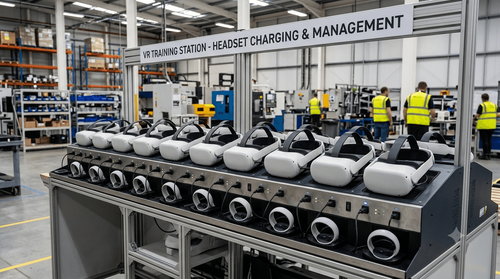
Content determines whether training works. Hardware determines whether it happens at all. A programme with excellent content and the wrong hardware fails in mundane ways: headsets that will not charge in time for the next shift, devices that need a laptop to update, hygiene arrangements nobody planned for, and an IT team that inherited forty unmanaged Android devices they never agreed to support.
None of these are technology problems. They are deployment problems, and they are entirely predictable if you think about them before purchase rather than after.
Key takeaways
- Standalone headsets are the default for industrial training; tethered PC-VR is for a narrow set of high-fidelity cases.
- Device management is the difference between a deployment and a pile of devices.
- Hygiene and comfort determine adoption on a shop floor more than specifications do.
- Match the hardware to the training model, not to the best available specification.
- Plan the refresh cycle and the support model before the first purchase order.
Standalone versus tethered
The first decision, and for most industrial training the answer is standalone.
Standalone headsets run everything on the device. No PC, no cables, no external sensors. They are portable, they can be deployed to a training room or a plant floor or a contractor gate, and they can be set up by someone who is not from IT. Rendering capability is limited compared with a workstation, but modern devices handle industrial training environments comfortably.
Tethered PC-VR connects to a workstation with a high-end graphics card. It delivers higher visual fidelity and can run physically demanding simulations, connect directly to engineering software, and drive very large environments. The cost is mobility and complexity. Every station needs a PC, a defined space, and cable management.
Choose tethered when the training genuinely requires it: high-fidelity engineering visualisation, simulations connected to live process models, or environments too large to run on-device. Choose standalone for everything else, which in practice is most safety and procedural training.
A mixed estate is common and sensible. A few tethered stations at the central training centre for the complex work, and standalone devices distributed to sites.
Specifications that actually matter
Resolution and field of view get the marketing attention. In practice, four other things determine whether the deployment works.
Battery life and charging. Two to three hours of continuous use is typical. If you plan to train continuously through a shift, you need enough devices to rotate, or hot-swap batteries where supported, or a charging arrangement between sessions. This is the single most common cause of a training day running short.
Weight and balance. A device that is comfortable for ten minutes may be unpleasant for forty. Front-heavy designs cause more fatigue. Rear-mounted battery designs balance better. For long modules, this matters more than pixel count.
Hand tracking and controllers. Controllers are precise and reliable but require an explanation for first-time users. Hand tracking is more intuitive for procedural training where the learner is manipulating equipment, and removes a piece of hardware to lose and charge. Many modules use both.
Prescription eyewear. A meaningful proportion of any industrial workforce wears glasses. Check whether the device accommodates them or requires prescription inserts, and budget accordingly. This is routinely forgotten and routinely causes friction.
Passthrough quality matters if you plan any mixed reality content, where virtual elements overlay the real environment. For training on equipment that physically exists in the room, this is increasingly useful.
Device management is the real decision
A single headset is a device. Forty headsets across six sites is an estate, and it needs managing like one.
Without a management platform you are manually connecting each device to a laptop to install content, manually updating firmware, manually reconfiguring after every reset, and physically travelling to sites to fix things. Organisations discover this at around device fifteen.
A device management platform handles content distribution, firmware updates, kiosk mode so learners see only the training application, configuration policies, usage monitoring and remote troubleshooting. Some headset manufacturers offer their own; several third-party platforms exist.
Kiosk mode deserves specific mention. Left unrestricted, a training headset becomes an entertainment device. Locking it to the training application removes that conversation entirely.
Confirm before purchase: does the device support enterprise management, does it work with a platform your IT function will accept, and what does that platform cost per device per year.
Hygiene, comfort and the shop floor
Shared headsets on an industrial site raise practical questions that specification sheets do not address.
Facial interfaces need to be cleanable or replaceable. Silicone or PU covers that wipe down are standard. Disposable liners work where throughput is high. Have a defined cleaning protocol and make it visible, because a workforce that is uncertain about hygiene will find reasons not to participate.
Heat and humidity matter in Indian plant conditions, and in many facilities the training room is not air conditioned. Devices throttle when hot, and a sweating learner in a shared headset is a hygiene issue and a comfort issue simultaneously.
Dust and contamination affect lenses and sensors. Storage cases are not optional in a cement plant or a foundry.
Plan the physical space too. Standing room-scale training needs a clear area with defined boundaries. Seated training needs less. Neither should be improvised in a corridor.
Sizing the estate
The number of devices follows from the training model, not from a budget line.
Work out how many people need training, how long each module takes, how many sessions fit into a day allowing for briefing, fitting, charging and cleaning, and how much of the year the programme is running. That gives a throughput requirement.
Then add for failure and repair. Devices break, particularly in industrial environments. A spare ratio of around ten percent is reasonable.
Consider whether devices are centralised or distributed. Centralised is easier to manage and utilises hardware better. Distributed removes travel time and makes short refresher training practical, which is often where the real value sits.
Total cost and the refresh cycle
The purchase price of the headset is a minority of the total cost.
Budget for the management platform subscription, charging and storage infrastructure, replacement facial interfaces and consumables, spare devices, IT support time, and content licensing where applicable.
Then plan for refresh. VR hardware generations turn over every two to three years, and support for older devices ends. Assume a three-year replacement cycle and confirm with your content provider that modules will be maintained across hardware generations. A programme built on a device that goes out of support with no migration path is an expensive lesson.
Frequently asked questions
Which headset should we buy?
That depends on your training model, your IT constraints and your management platform, and the answer changes as devices are released. Define the requirements first, then evaluate current devices against them rather than starting from a product name.
Can we use consumer headsets for enterprise training?
Many organisations do, but check the licensing terms for commercial use, the availability of enterprise management, and whether an account is required for each device.
How many headsets do we need to start?
Pilots typically run on two to five devices. That is enough to validate content and measure outcomes without committing to an estate.
Who owns the headsets internally, IT or L&D?
Both need to be involved from the start. L&D owns the programme, IT owns the device estate, and deployments where IT is engaged late tend to stall.
If you want help sizing an estate and defining hardware requirements against your actual training plan, EDIIIE can work through it with your L&D and IT teams."